Sky Wallpaper icon App Store release coming soon

Your desktop, painted by the real sky.

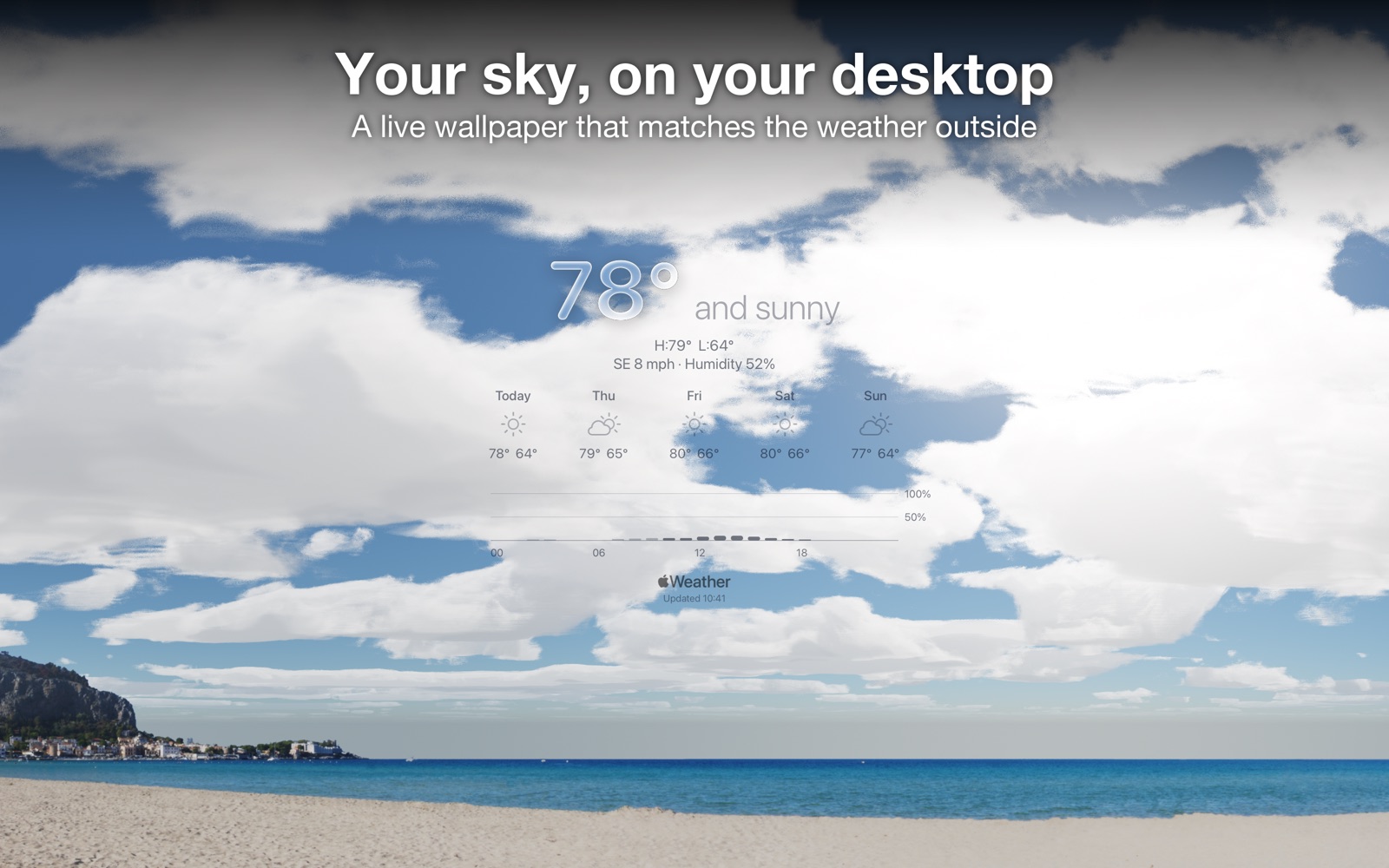
Sky Wallpaper reads the weather where you are and paints your Mac desktop to match: clear blue, drifting cloud, rain, snow, fog, storms, golden hour and the quiet blue after sunset. The sun and moon sit where they really are, over photographic landscapes that change with the hour.

Coast · City · Mountains · Forest · Snow

macOS 14 Sonoma+Lives in your menu bar
One-time purchaseNo subscription
No trackingNo account, analytics or ads
Apple WeatherLive local conditions
You’re in controlPause or restore any time

The sky outside, on your desktop.

A sky that is actually right. Landscapes that are yours.

The sky

Painted from the real conditions

  • The sun and moon sit where they really are, and the moon shows its true phase
  • Cloud cover, rain, snow, fog, lightning and wind follow the current conditions
  • Sunrise and sunset glow, and clear nights show the stars
  • Rare skies appear when the weather and the sky agree: a rainbow after rain, a meteor shower night, and the aurora when NOAA reports a storm strong enough to reach you
  • An optional High-quality sky paints clouds, light and stars in much finer detail
The land

Photographic landscapes

  • Coast, city, lake, mountains, forest, snow and the tropics, each lit for the hour
  • Automatic picks a scene that suits where you live, worked out on your Mac from maps built into the app
  • Surprise me daily gives you a different landscape each day
  • Someone else’s sky: choose a city where someone you love lives and your wallpaper shows their weather and names the place
Know what’s coming

Look ahead

  • Rain in the next hour, today’s high and low, a 5-day forecast and the chance of rain by hour, right on the wallpaper
  • Next 24 Hours: slide through today and tomorrow’s sky from the menu bar
  • Optional weather alerts, and Sky moments for golden hour, a rainbow, a meteor shower or an aurora
  • The temperature in the menu bar, in Celsius or Fahrenheit
Make it yours

Choose how it looks

  • Looks — Pure Sky, Minimal, Dashboard and Storm Watcher — set everything written on your wallpaper in one click
  • Pick the temperature style, text colour, contrast, position and size
  • Sky Journal: one picture a day, kept on your Mac, with your streak
  • Save This Sky keeps the picture on your desktop right now
  • Shortcuts support: a “Get Current Sky” action hands the picture to Shortcuts, so you can send it to your phone or a message

Asks first. Changes back when you say.

  1. Nothing changes until you say so. A welcome window explains what the app will do. Until you choose “Start Changing My Wallpaper”, it changes nothing and makes no weather request.
  2. It looks up your weather. Allow location, or type a city instead. It refreshes through the day and keeps the sun moving between updates.
  3. Pause or restore from the menu bar. “Restore My Wallpaper” puts your picture wallpaper back. macOS does not let apps save Aerial or moving wallpapers, so you would choose those again in System Settings.

No account. No tracking.

Sky Wallpaper has no account, analytics or ads. AppMast runs no server for it and receives no data from it. It reaches the internet only to:

Your Sky Journal and settings stay on your Mac. Details are in our privacy policy.

Real answers from the studio.

Not on the App Store yet

Sky Wallpaper is being prepared for review. Want to know the day it’s available?

Notify Me
Weather data is provided by Apple Weather. Landscape selection uses climate data from Beck et al. (2023), CC BY 4.0; cities from GeoNames, CC BY 4.0; lakes from Natural Earth; elevation from NOAA ETOPO1.